Scheduling Metaflow Flows with Kubeflow
The Kubeflow integration is new and currently released as a Metaflow extension which you need to install separately as instructed below. The feature set is still evolving and hence subject to change. Reach out to us on Metaflow Slack if you have questions about the integration!
Metaflow’s Kubeflow integration lets you develop workflows using Metaflow’s full, developer-friendly feature set, and then deploy those flows to your existing Kubeflow infrastructure, where they run seamlessly alongside your current Kubeflow pipelines.
The deployed pipelines are both valid Metaflow flows and Kubeflow pipelines, allowing you to observe them in real time in the Kubeflow UI and in the Metaflow UI, and to access results through Metaflow’s Client API as usual.
You can see this in action in this short screencast (no sound):
Why use Metaflow with Kubeflow
The video highlights the main benefits of the integration:
Metaflow provides a top-notch developer experience, sparing the developer from Kubernetes-specific technical details.
You can test flows locally at arbitrary scale using the same Kubernetes infrastructure that you use with Kubeflow.
Most Metaflow features, such as resuming, observability with cards, dependency management, configuration management, namespaces, artifacts and Client API, work out of the box, greatly enhancing the functionality available in Kubeflow Pipelines.
Deploy to Kubeflow Pipelines with a single command, no changes in the Metaflow code required.
Note that Kubeflow Pipelines is built on top of Argo Workflows, so its scalability and high-availability characteristics closely mirror those of Metaflow’s native Argo Workflows integration, with potential additional overhead introduced by the Kubeflow components.
Setting up the Kubeflow-Metaflow integration
Currently, the integration is provided as a Metaflow Extension which you can install as follows
pip install metaflow-kubeflow
Note that you have to install the extension only on the laptop, server, or CI/CD worker where you deploy workflows. It doesn't need to be present on containers executing tasks.
In order to be able to deploy to Kubeflow, you need to be able to connect to Kubeflow. In case you don't have connectivity already set up, see this README for suggestions.
You can specify the Kubeflow endpoint address every time you deploy, or you can
add it in your Metaflow config (typically at ~/.metaflowconfig/config.json):
"METAFLOW_KUBEFLOW_PIPELINES_URL": "http://my-kubeflow",
Replace http://my-kubeflow with the actual address.
Pushing a flow to Kubeflow Pipelines
Let's use the flow from the section about parameters as an example:
from metaflow import FlowSpec, Parameter, step

class ParameterFlow(FlowSpec):
    alpha = Parameter('alpha',
                      help='Learning rate',
                      default=0.01)

    @step
    def start(self):
        print('alpha is %f' % self.alpha)
        self.next(self.end)

    @step
    def end(self):
        print('alpha is still %f' % self.alpha)

if __name__ == '__main__':
    ParameterFlow()
Save the flow in a file parameter_flow.py. To deploy a version to Kubeflow Pipelines,
type
python parameter_flow.py kubeflow-pipelines create
Or, if you haven't specified METAFLOW_KUBEFLOW_PIPELINES_URL in your Metaflow
config, specify a Kubeflow URL on the command line:
python parameter_flow.py kubeflow-pipelines --url http://my-kubeflow create
This command will package the flow and its execution environment, convert it to a Kubeflow Pipeline, and deploy it to the specified server.
The pipeline name matches the flow name. Each deployment created with
kubeflow-pipelines create produces a new pipeline version, which by default is
named using the current timestamp, unless you explicitly override the version name
with the --version-name option.
Conditional and recursive steps introduced in Metaflow 2.18, are not yet supported on Kubeflow deployments. Contact the Metaflow Slack if you have a use case for this feature.
Triggering a Kubeflow run
You can trigger a deployed flow to run on Kubeflow pipelines with the trigger
command:
python parameter_flow.py kubeflow-pipelines trigger
Specify --url as above, unless the URL is specified in the config.
You can also trigger a run as a specific Kubeflow Experiment:
python parameter_flow.py kubeflow-pipelines trigger --experiment new_model
By default, the latest version of the flow is triggered. You can trigger an
older version by specifying --version-name:
python parameter_flow.py kubeflow-pipelines trigger --version-name 20251216021104161376
Currently you can trigger a Kubeflow run on the CLI with trigger or through the Kubeflow UI. If you are interested in scheduled or event-triggered runs, reach out to us on Metaflow Slack
Passing parameters
You can pass parameters to a Kubeflow run either on the command line:
python parameter_flow.py kubeflow-pipelines trigger --alpha 0.5
Or through the Kubeflow UI when creating a new run:
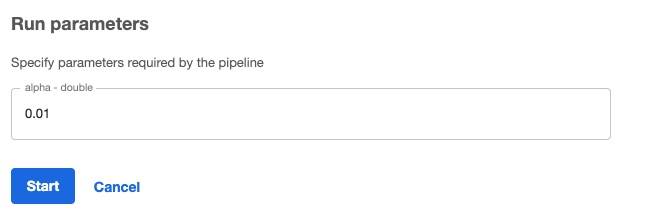
Note how the alpha Parameter defined in the flow above maps to the corresponding
parameter in the UI.
Inspecting the results of a Kubeflow run
Every Kubeflow run is a valid Metaflow run which you can inspect using the Metaflow UI and the Client API as usual.
Note that Metaflow's namespaces apply on Kubeflow too, so to access Kubeflow results, you can switch to the global namespace, like here:
from metaflow import Flow, namespace
namespace(None)
run = Flow('ParameterFlow')['kfp-066dcf8a-61dd-4f61-b652-e161124bc3b3']
print(f'Alpha is {run.data.alpha}')
Metaflow Run IDs corresponding to Kubeflows runs match their Kubeflow
run IDs, prefixed with kfp- (e.g. kfp-066dcf8a-61dd-4f61-b652-e161124bc3b3) so you can easily identify and track lineage of runs between Metaflow and Kubeflow.